|

|
Create Your Team
This page gives you all the rules and information you need to create and
enter a Fantasy Grand prix Team. Details about Point Scoring and in season
rules can be found on the Point Scoring page.
Fantasy Grand Prix is open to all at the discretion/invitation of the FGP
Manager. Families and friends of previous players are encouraged
to play. All players must have access to the internet as results are only available via this website. An
email account is required for contact purposes.
- The fee for the entire season is £20.00 per team, this covers all
24 races.
- The First Race is on Sunday 8 March
- All entries must be received No Later Than 8.00pm Wednesday 25
February
- All fees must be paid prior to the first race weekend (Wednesday 4
March latest)
of the season by
bank transfer (details will be emailed to you) or from your 2025
winnings if held by the FGP Manager. Other methods of payment only by prior agreement with the FGP Manager.
- All entries must be submitted via the Team Selector, emailed to Kevin.
- There is no limit to the number of teams each player may submit.
- One entry
form per FGP team.
Prize Money
There are prizes for the leading teams at all Races, and the final Championship
positions. These will be paid to winners at the end of
the season. See Prizes.
The Team Selector
The easiest way to create a team is by using the Team
Selector, which on PC, tablet or
mobile. However, you should read all of this page before
starting to create a team!
See opposite for details.
Choose Your Team
Top | Prizes |
Team Selectors | Choose
Your Team
About FGP Teams | Driver &
Car Prices
Chose your start
Race team carefully - Transfers 1 takes place after Race 4,
Transfers 2 after Race 11, and Transfers 3 after Race 18.
- Teams are made from ‘elements’: A driver is an element.
A car is an element.
- A complete FGP team is made up as follows:
- Race Team:
- Select Three Drivers and Three Constructors
• Place the Drivers in the Cars
- Transfer Team 1:
- This is intended as a minor adjustment Transfer.
Not all Drivers/Cars are available.
- Select Two ‘elements’ (Drivers/Constructors) of
which you can only use a maximum of one.
- Transfer Team 2:
- Select a total of Four ‘elements’
(Drivers/Constructors) Your four choices must include at
least one of each, cars and drivers. The Team Selector
guides you through this combination.
- Transfer Team 3:
- Select Two ‘elements’ (Drivers/Constructors).
Note:
You must put a Driver/Car against all spaces in each section.
Read 'Guide To Transfers' opposite
Bonus Races
The
Bonus Races are new for this year (although some may remember the idea
from the past).
You must select two Bonus Races for the season as follows:
- One from the six Sprint Race Weekends (See
Race Diary).
- One other race (However, you may not select the last two
races of the season.
- See Bonus Races Scoring on the
Point Scoring page
See 'Rules About
Teams' below
Driver and Constructor Prices, and available budgets follow
below.
 Rules About FGP Teams Rules About FGP Teams
Important - READ THIS!
- You may select a maximum of
TWO
elements from each F1 Team team for your FGP Race Team.
- Drivers may not be placed in their real F1 Car at any time throughout
the season.
- Your Transfer Teams may contain several elements from a real F1 team,
however When transfers are made, the Race Team must adhere to the rules
above.
- You may only name a Constructor or Driver once
- You must fill all available places within the Race Team and Transfer
sections
- Transfers 1 does not allow you to have all elements due to their prices
- When selecting a Driver, you are actually selecting
that teams Driver no.1 or no.2 as indicated in the table below (This is
only relevant should drivers transfer between F1 teams during the season -
See Driver Changes and Replacements
- Unique Teams: At the
start of the season all Teams must be unique. This will be based on the Race
Team plus the highest priced elements in T2 and T3. Drivers that are placed
in 'opposite' cars (in Race Team) to another team will be considered unique.
- Entries will be 'Time stamped' on receipt. If duplicated teams are received
the FGP Manager will attempt to resolve by switching the named Race Team
cars and drivers around for one of the teams. If not resolved, the player that entered the team first will get their choice, other teams will need to be
amended. (The FGP Manager's decision is
final).
- Each team should be given a ‘Team Name’ (Strictly No Offensive Names)
- A complete list of all teams (‘The Starting Grid’) will be published
before the first race. See 'Starting Grid and
Statistics' page
Top | Prizes |
Team Selectors | Choose
Your Team
About FGP Teams | Driver &
Car Prices
Driver and Constructor Prices
Make your selections from the two tables below:.
Use the Team Selector to help you choose a team. It can then be used to
either print an entry form, or saved and sent to the FGP Manager via email.
Drivers
| |
Driver |
(Car) |
£m |
| 1 |
Lando Norris |
McLaren |
18 |
| 2 |
Oscar Piastri |
McLaren |
17 |
| 1 |
George Russell |
Mercedes |
17 |
| 2 |
Andrea Kimi Antonelli |
Mercedes |
14.5 |
| 1 |
Max Verstapen |
Red Bull |
18 |
| 2 |
Isack Hadjar |
Red Bull |
13.5 |
| 1 |
Charles Leclerc |
Ferrari |
15 |
| 2 |
Lewis Hamilton |
Ferrari |
14 |
| 1 |
Carlos Sainz jr. |
Williams |
10 |
| 2 |
Alex Albon |
Williams |
9.5 |
| 1 |
Fernando Alonso |
Aston Martin |
8.5 |
| 2 |
Lance Stroll |
Aston Martin |
6.5 |
| 1 |
Esteban Ocon |
Haas |
7 |
| 2 |
Oliver Bearman |
Haas |
7.5 |
| 1 |
Liam Lawson |
Racing Bulls |
7 |
| 2 |
Arvid Lindblad |
Racing Bulls |
5.5 |
| 1 |
Nico Hulkenburg |
Audi |
6.5 |
| 2 |
Gabriel Borteleto |
Audi |
6.5 |
| 1 |
Pierre Gasley |
Alpine |
6 |
| 2 |
Franco Colapinto |
Alpine |
5 |
| 1 |
Sergio Perez |
Cadillac |
6 |
| 2 |
Valterri Bottas |
Cadillac |
6 |
Constructors
| Constructor |
£m |
|
Constructor |
£m |
| McLaren |
21 |
|
Aston Martin |
8.5 |
| Mercedes |
19.5 |
Haas |
8 |
| Red Bull |
18.5 |
Racing Bulls |
7.5 |
| Ferrari |
17 |
Audi |
7 |
| Williams |
12 |
Alpine |
6.5 |
| |
|
Cadillac |
6 |
- You are allotted £67-Million Pounds for your Race Team
- You are allotted £17-Million Pounds for Transfer Team 1
- You are allotted £40-Million Pounds for Transfer Team 2 (plus any money
left after selecting your Race Team may be added to your Transfer Team
2 funds.)
- You are allotted £28-Million Pounds for Transfer Team 3 (plus any money
left after selecting Transfer Team 2 may be added to your Transfer Team
3 funds)
- Totals may be under the full available amounts.
- Once transfers are made (within transfer seasons) Race Team values may
exceed £67-million.
- Read 'A Guide To Transfers' opposite
Once you have sorted your teams as above, send your entry to Kevin Staden, details of
payment will then be emailed to you.
Scoring of FGP is shown on the In Season and
Points Scoring page. You can use this
to verify your scores when the FGP result is published after every race.
Top | Prizes |
Team Selectors | Choose
Your Team
About FGP Teams | Driver &
Car Prices
|
A Guide To Transfers
Transfers 1:
- Takes place after Race 4
- You choose two elements
- The money (£17m) available for T1 is 'locked'. No
leftover money from the Race Team is brought forward here
(see Transfers 2), and any money you don't use in T1 is
lost.
- There are several Drivers and Cars that are not
available within T1.
- You may only use one element from T1 to make a transfer,
the other is 'lost'
- The transfer must be made before Race 5
- Once the transfer is made, the remaining element in T1
along with the element moved out of the Race Team is 'locked'
and may not be used for the rest of the season.
- Making a Transfer from T1 is free
(i.e. No Championship Points deduction).
Transfers 2:
-
Takes place after Race 11
- You choose four elements
- You have £40m to spend, plus anything left from your
Race Team
- All drivers and cars are available
- The first Transfer made in this phase is free
(i.e. No Championship Points deduction).
- Second and further transfers made within the T2 phase will
cost a 50 Championship Point deduction
- You may make a maximum of Three transfers from your T2
selections
- Remember: When you
make transfers at this stage your Race Team may still not
contain more than TWO elements from any teams. i.e: If you already have
Norris
and Piastri in your Race
Team, if you have put McLaren in your T2 choices
the only way to move them into your Race Team is to first
move either Norris or Piastri out.
- Note: You must
include at least one driver, and one car within your four
choices
Transfers 3:
-
 Takes place after Race 17
-
You choose two elements
- You have £28m to spend, plus anything left from
Transfers 2
- All drivers and cars are available
- You may still only have a maximum of TWO elements from
an F1 team (as above)
- Each transfer made after Race 18 costs 350
Championship Points
- You may not make further transfers after Race 23
- Note: You will have
a maximum of Six races to make the Transfer points back
Notes
- At no point throughout the entire season can a Driver be
in his own F1 Team Car.
- You may only make One transfer per race
- Drivers/cars may only be moved within the race team to
avoid the driver in own F1 car rule above.
- See above for the new limits on number of transfers allowed.
FGP Team Selector
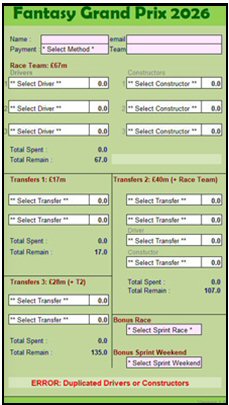 The Team Selector is a tool to make choosing your team a lot
easier. You can also use it as your entry form and send a copy
via email to the FGP Manager. The Team Selector is a tool to make choosing your team a lot
easier. You can also use it as your entry form and send a copy
via email to the FGP Manager.
The Selector works on PC, tablet and mobile phone. You will
need a suitable spreadsheet app installed (Mobiles phones I
suggest Microsoft's free version of Excel).
On opening the Selector for the first time you will be
presented with the 'How To Use' screen, giving you details of
what to do, etc. Use the tabs at the bottom to move to the main
selector page.
Use the Drop-Down arrows to select drivers and cars. The
selector will inform you when you are 'Over Budget', as well as
other errors made. You can also select the two required bonus
races.
Saving Teams: When you have a team you like, use 'Save As...'
and save it with name you can later refer too when reloading,
etc. This is also the file you can use to send as your entry to
the FGP Manager.
If you wish to enter more than one team, then each time you
will need to start again and create the next team. Sorry, there
are no Clear buttons.
Don't forget to add your name, team name, etc at the top of
the screen.
|